How to Download Sourav Joshi Game for Free on Android & PC (2026)

Want to download the Sourav Joshi game for free on your phone or laptop? The game many viewers are looking for is Joshi ji – Open World Car Game, a driving and daily-life simulator from RG Apps Studio. You can explore a town, drive cars, spend time at a family home, play sports challenges and record pretend vlogs inside the game.
The good news is that you do not need to pay to install it. The game is available through Google Play on Android and Google Play Games on supported Windows computers. It contains ads, but the download itself is free.
This guide explains how to download Joshi ji safely, with separate instructions for Android phones and Windows PCs or laptops. We’ll also cover gameplay, common installation problems, performance tips and iPhone availability.
Quick answer: Android users can install Joshi ji – Open World Car Game from Google Play. Windows users can access the same title through Google Play Games on PC. Check that the developer is RG Apps Studio before installing.
Page Contents
What Is the Sourav Joshi Game?
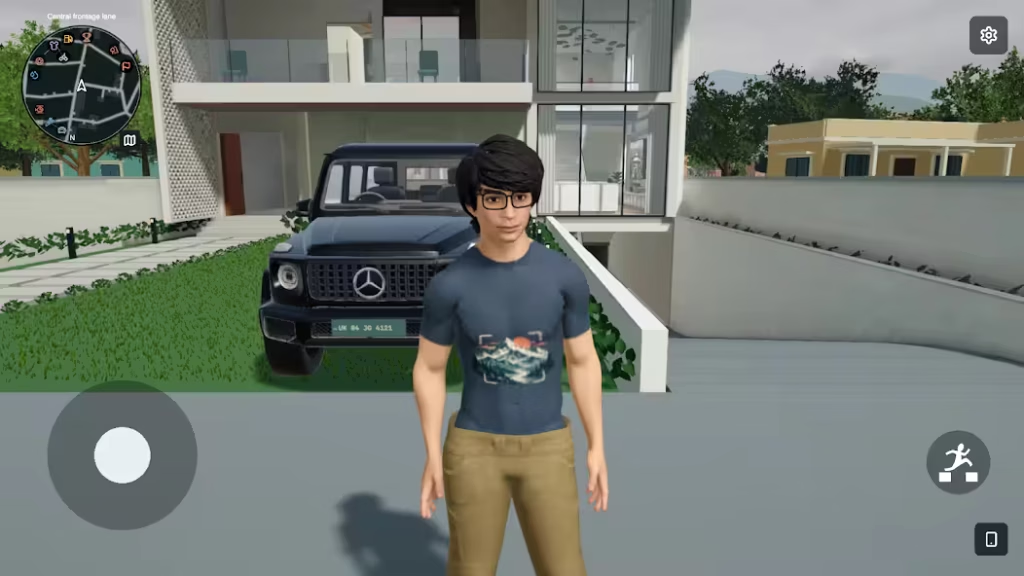
Joshi ji – Open World Car Game is a 3D life-and-driving simulation released in October 2026. It appeals to fans of family vlogs because the activities are about ordinary adventures: leaving your house, driving around the neighbourhood, spending time with family characters, trying challenges and recording clips of your day.
Joshi ji – Open World Car Game is published by RG Apps Studio. We could not verify an official endorsement or publishing connection with YouTuber Sourav Joshi. Treat it as a game inspired by the family-vlog style, not as a confirmed official game made by the creator.
| Game name | Joshi ji – Open World Car Game |
|---|---|
| Developer | RG Apps Studio |
| Genre | Open-world driving and life simulation |
| Platforms | Android and Windows via Google Play Games on PC |
| Price | Free to install; contains ads |
| Content rating | Everyone on Google Play |
| Release | October 27, 2026 |
| Android download | Google Play Store |
| PC download | Google Play Games on PC |
How to Download Sourav Joshi Game for Free on Android — Step by Step
Follow these steps if you have an Android smartphone. You do not need to download an APK file or install another app.
Step 1: Connect your phone to the internet
Turn on Wi-Fi or mobile data. Because Joshi ji is a 3D game, Wi-Fi is recommended if your mobile data is limited. Check that you have enough free storage for installation and future updates.
The download size can change between versions. Always check the current storage information in Google Play.
Step 2: Open Google Play Store
Find the colourful triangle-shaped Play Store icon on your Android phone and tap it. If Google Play asks you to sign in, use your Google Account.
Younger players should ask a parent or guardian for help with their account and installation settings.
Step 3: Search for the exact game name
Tap the search box and type Joshi ji – Open World Car Game.
Some people search for Saurav Joshi game, Sourav Joshi Vlogs game or Sourav Joshi car game, but those searches can show unrelated apps. The exact title and developer are more reliable than a similar-looking icon.
Step 4: Verify the official game listing
Open the game page and check that the developer is RG Apps Studio.
Look at the game’s description, screenshots, content rating and any compatibility information. The official Android app ID is com.joshi.openworld.game.
Step 5: Tap Install and wait for the download
Tap Install once and allow Google Play to complete the download and installation. Keep your internet connection active.
If Google Play says the game is incompatible with your device, do not try to bypass the warning with an unknown APK website.
Step 6: Open the game
After installation, tap Play in Google Play or find the game’s icon on your phone.
The first launch may take longer while the 3D environment loads. Let it finish instead of repeatedly closing the game.
Step 7: Adjust the graphics settings
The developer provides settings for graphics quality, brightness, camera sensitivity and frame rate. If your game feels slow or your phone becomes hot, reduce the graphics settings.
Higher graphics settings are not automatically better, especially on older phones.
Step 8: Start exploring the town
Use the on-screen movement controls to explore the house and nearby streets. Get into a vehicle to switch to the driving controls, and use the map to find different activities.
You can visit the racing area, play sports or return home when you want something different to do.
How to Download Sourav Joshi Game for Free on PC or Laptop — Step by Step
Yes, you can play Joshi ji – Open World Car Game on a supported Windows computer. The game has an official listing on Google Play Games on PC, which lets eligible Windows users play Android games on a bigger screen.
This is the same game, not a separately confirmed Steam or standalone Windows release. The main gameplay activities remain the same, but controls and performance may differ between mobile and PC.
Before You Start: Check the PC Requirements
Google Play Games on PC requires a Windows computer that meets its minimum system requirements:
| Component | Minimum requirement |
|---|---|
| Operating system | Windows 10 version 2004 or later |
| RAM | 8 GB |
| Storage | SSD with at least 10 GB free |
| Processor | 4 physical CPU cores |
| Graphics | Intel UHD Graphics 630 or comparable |
| Account | Windows administrator access |
| Virtualisation | Hardware virtualisation enabled |
These are Google’s platform minimums, not a guarantee that the game will run smoothly on every eligible computer. You can check the latest requirements on Google Support.
PC Step 1: Open the official Google Play Games website
On your Windows desktop or laptop, open Chrome, Edge or another browser and visit Google Play Games on PC.
Make sure the website belongs to Google before downloading anything.
PC Step 2: Download the Google Play Games installer
Click the Download or current Windows download option. When the file finishes downloading, open it and follow the installation instructions.
You may need to approve an installation request using your Windows administrator account.
PC Step 3: Enable virtualisation if requested
Google Play Games may ask you to enable Windows Hypervisor Platform. Follow the instructions shown by the installer and restart your computer if required.
Your computer may also need processor virtualisation enabled in BIOS or UEFI settings. This depends on the hardware manufacturer.
If you are unfamiliar with BIOS settings, follow the official instructions from your laptop or motherboard manufacturer rather than changing settings at random.
PC Step 4: Sign in to Google Play Games
Launch Google Play Games on your PC and sign in using your Google Account.
You can use the same Google account as your Android phone. However, do not assume that all of this particular game’s progress automatically synchronises between devices, because Google does not guarantee cross-device syncing for every game.
PC Step 5: Search for Joshi ji – Open World Car Game
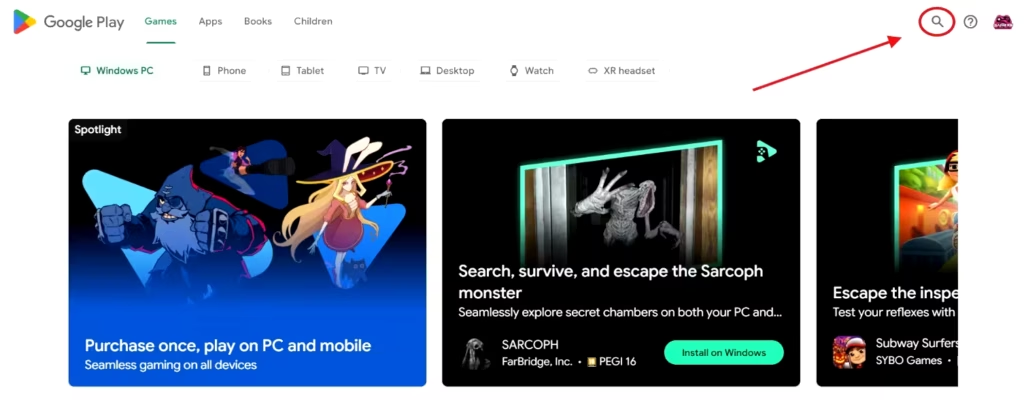
Inside Google Play Games, use the search option and type Joshi ji – Open World Car Game.
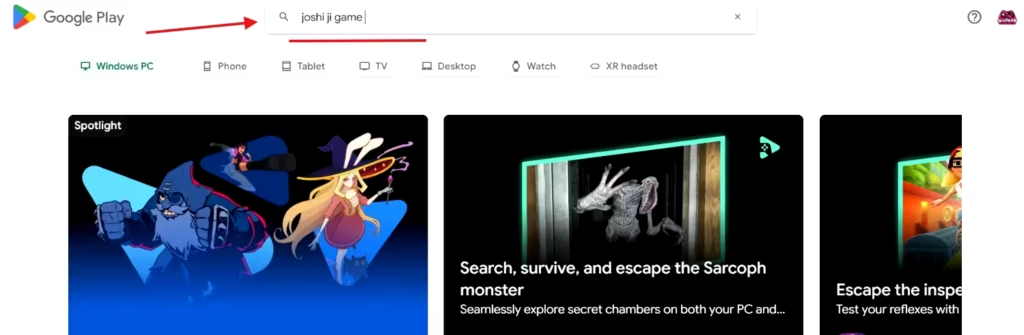
Check that the developer is RG Apps Studio.
You can also open the official Joshi ji Google Play Games PC listing in your browser.
PC Step 6: Click Install
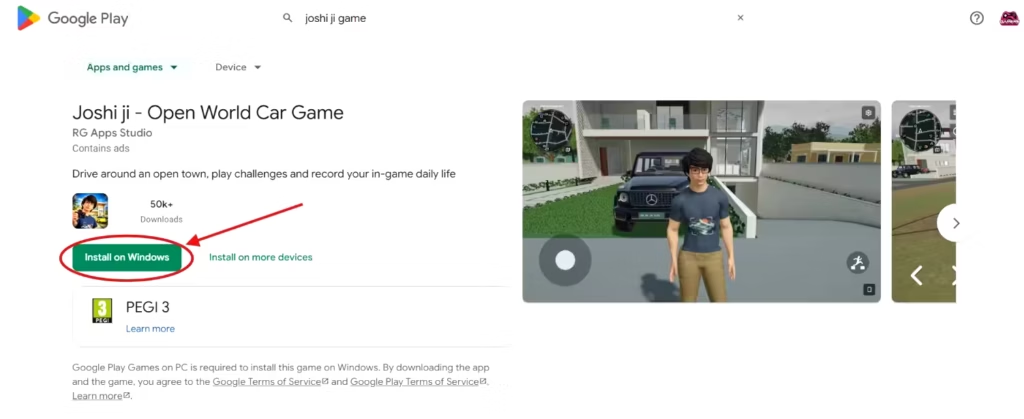
Click Install and allow Google Play Games to download the game. Make sure your computer has sufficient storage and a stable internet connection.
Google Play Games itself is free, and Joshi ji is free to install, although the game contains ads.
PC Step 7: Launch the game
Once installation finishes, open Joshi ji from your Google Play Games library.
Follow the controls shown on your screen. The mobile game uses touch controls, while the Windows experience may use keyboard and mouse input or a control-mapping system.
The exact controls can vary, so check the instructions displayed in Google Play Games rather than assuming every mobile gesture has the same PC keyboard shortcut.
PC Step 8: Adjust graphics and start playing
Explore the house, drive cars, play badminton or basketball and try the simulated vlog feature, just as you would in the mobile game.
If the game runs slowly, reduce its graphics quality or frame-rate settings. Actual performance depends on your CPU, graphics hardware, memory and the game’s current compatibility.
What Does the Game Look Like?
The official Google Play screenshots show a colourful 3D town with roads, vehicles, buildings and different activities. The driving interface includes controls and a map to help players explore.
Screenshot note: Gameplay screenshots should come from the game’s official store listing. Installation screenshots should show the real Google Play Store or Google Play Games interface, not AI-generated illustrations.
What Can You Do in Joshi ji – Open World Car Game?
1. Drive around an open town
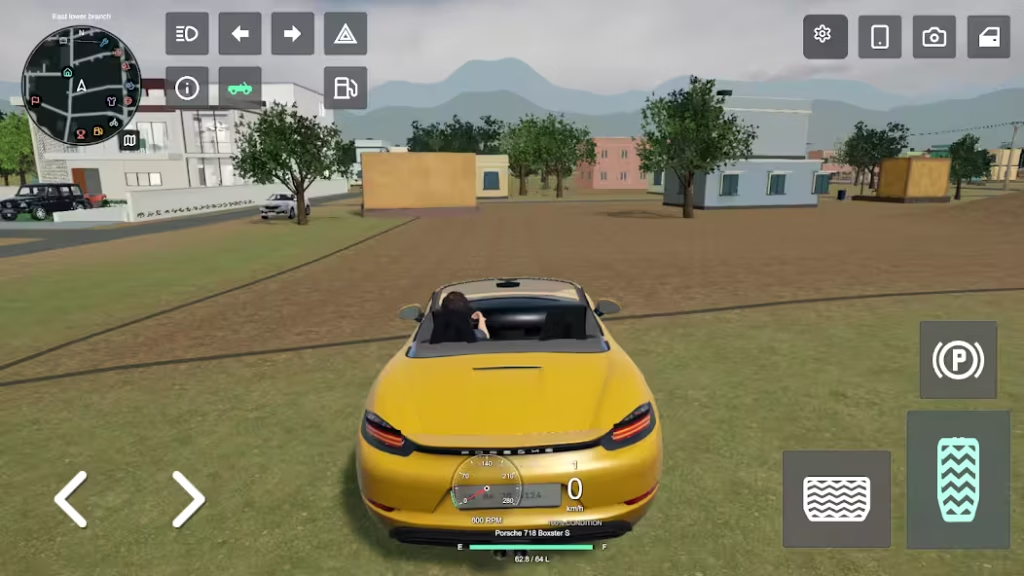
The game gives you neighbourhood streets to explore instead of only one fixed racing track. You can drive different vehicles, use the map to find places and return to the house whenever you want.
There are also vehicle-related details such as refuelling, garage visits and vehicle recovery if a car gets stuck.
If the driving is your favourite part, our article on open-world car games for Android and iPhone has more driving-focused titles to compare.
2. Spend time at home
Part of the experience is everyday family life. You can move around the house, visit rooms, interact with family characters and change your outfit at the wardrobe.
This is why the game feels closer to a small life simulator than a traditional car-racing game.
3. Play badminton and basketball
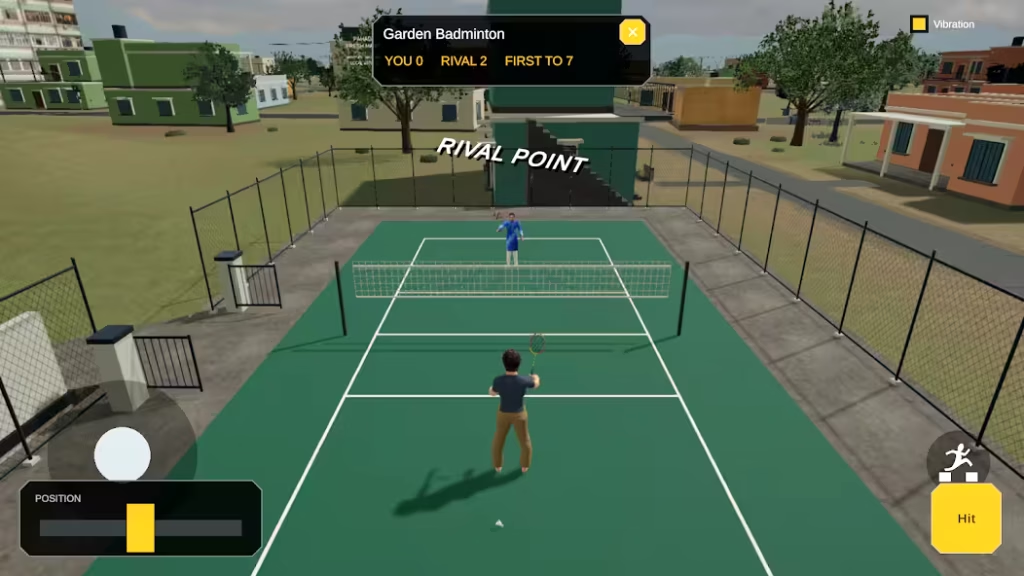
Driving is not the only activity. The official store description also mentions badminton and basketball challenges.
These give you a break from cars and a way to earn in-game coins by completing activities.
4. Record and publish pretend vlogs
The in-game phone and camera let you record moments from the virtual town, review clips and publish them to a simulated in-game video channel.
This does not upload anything to your real YouTube channel or social-media accounts. It’s a gameplay feature that copies the idea of making vlogs.
5. Earn coins and try more activities
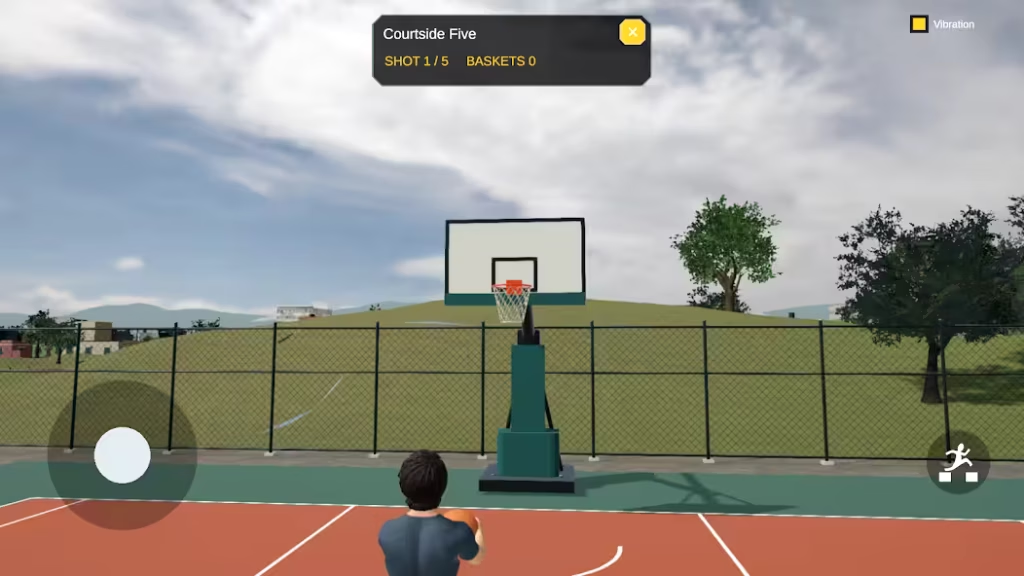
Completing challenges can give you coins, and some rewards offer an optional ad to increase the amount earned.
Certain temporary vehicles or activities may also ask you to watch a rewarded advertisement. These coins are for the game only and have no cash value.
Is the Sourav Joshi Game Completely Free?
It is free to install from Google Play. The store lists it as containing ads.
That is different from saying every reward, vehicle or activity is available instantly without watching an ad. The game’s own description explains that rewarded video ads are part of some features.
You do not need to pay a website to unlock a download link. Avoid pages that demand payment, ask for your Google password or tell you to disable Play Protect before installing.
Can You Download the Sourav Joshi Game on iPhone?
We found verified Android and Google Play Games on PC listings for Joshi ji – Open World Car Game, but we could not verify a matching official Apple App Store release for this exact game.
Do not assume an iPhone app with a similar name is the same game. Android APK files cannot be installed directly on an iPhone.
If the developer releases an iPhone version later, look for an App Store listing that identifies RG Apps Studio and matches the official game details.
Can You Play the Joshi ji Game Offline?
The official description confirms that rewarded ads require an internet connection. It does not clearly guarantee that every part of the game works offline.
After installing and launching the game, you can test normal exploration with your connection off, but do not rely on offline rewards or ad-supported unlocks.
For games with clearer offline-oriented experiences, browse our offline open-world games for Android and iPhone guide.
Joshi ji Game Not Downloading or Not Opening? Try These Fixes
Problem: The game does not appear in Play Store search
Search for the exact title instead of only typing Sourav Joshi. If you still cannot find it, open our direct Google Play link.
If the listing says it is unavailable in your country or on your device, availability or compatibility may be the reason.
Problem: It says “This app isn’t compatible with your device”
Check whether your Android version and hardware meet the current store requirements.
Phone requirements can change with updates; the Play Store’s actual compatibility decision for your device is the one to trust.
Updating Android can sometimes help, but an operating-system update cannot overcome every hardware limitation.
Problem: The download is stuck or pending
Try a stable Wi-Fi network, check available storage and pause any other large downloads.
Restart the Play Store or your phone if the download remains stuck. Avoid clearing important app data without understanding what will be removed.
Problem: Google Play Games will not install on Windows
Check whether your computer meets Google’s minimum requirements, especially the Windows version, 8 GB RAM, SSD space and hardware virtualisation.
If Windows asks you to enable Hypervisor Platform or restart your computer, follow the official setup instructions.
You can read the Google Play Games installation help page for additional solutions.
Problem: Joshi ji does not appear in Google Play Games on PC
Open the game’s official PC listing and check its compatibility information. Availability can depend on your region and computer hardware.
Google Play Games uses compatibility labels to explain whether a game is optimized, playable, untested, unsupported or unavailable on a computer.
If your system is unsupported, avoid downloading unverified Windows executables claiming to be the same game.
Problem: The game crashes after launching
Restart your phone or computer, close heavy background apps and install the latest official update.
If you can reach the game’s settings, lower graphics quality and frame rate. Because this is a new game, updates may also address early crashes or performance issues.
If the problem continues, use the developer’s contact option on Google Play to report your device model and where the crash happens.
Problem: The game runs slowly or heats up your device
Lower the graphics settings, avoid playing while the device is already hot and take a break if it becomes uncomfortable to use.
A demanding 3D game may not run smoothly on every entry-level phone or older laptop.
Problem: A rewarded ad or vlog feature does not work
Check your internet connection, because video ads need access to ad services and may not always be available.
Remember that the in-game vlog channel is a simulated feature. It does not send clips to real YouTube accounts.
Is It Safe to Download a Sourav Joshi Game APK From Another Website?
For this game, the safest recommended routes are its official Google Play listings on Android and Windows.
A third-party APK may be outdated, modified or unrelated to the current app. An unknown Windows executable may present additional risks.
This matters especially because several older, similarly named Sourav Joshi fan games have been removed from Google Play.
Before installing any app, confirm the developer, read recent reviews, check permissions and avoid sites that promise unlimited money, unlocked cars or a special mod version.
If the official version is unavailable on your device, an unknown download is not a reliable shortcut.
Frequently Asked Questions
What is the real name of the Sourav Joshi game?
The recent open-world game many people mean is Joshi ji – Open World Car Game by RG Apps Studio. Older games with Sourav Joshi in the title also exist, so the exact title matters.
How do I download Sourav Joshi game for free on mobile?
On Android, open the verified Google Play listing, confirm RG Apps Studio as the developer and tap Install. Wait for it to finish, then launch the game from your phone.
How do I download Sourav Joshi game on PC or laptop?
Install Google Play Games on your Windows computer, sign in to your Google account and search for Joshi ji – Open World Car Game. Check the developer and click Install.
The game also has an official PC listing.
Can I download a standalone Windows EXE or Steam version?
We verified the Windows route through Google Play Games on PC, not an official standalone Windows installer or Steam release. Avoid unknown PC download packages claiming to be the game.
Will the gameplay be the same on mobile and PC?
Both listings refer to the same game and core activities. However, controls, graphics performance and certain device features can differ. Cross-device save syncing is not guaranteed for every game.
Is Joshi ji game free or paid?
It is free to install but includes advertising. Some optional in-game rewards and features involve watching ads.
Is Sourav Joshi himself the developer?
The verified developer is RG Apps Studio. We have not established that Sourav Joshi personally developed, published or officially endorsed this game.
Can I drive cars and explore a city?
Yes. The official game description confirms open-town driving, different vehicles, a map, garage and refuelling features, plus additional activities beyond driving.
Can I make YouTube vlogs in the game?
You can record and publish pretend vlogs on the simulated in-game channel. It does not upload videos to a real YouTube account.
How much storage do I need?
Check the current download size in Google Play. Size changes with updates and device-specific downloads, so leave extra free storage rather than assuming an old number remains accurate.
For Windows, Google Play Games itself requires an SSD with at least 10 GB of available space.
Can I play it on an iPhone?
No matching official App Store listing for Joshi ji – Open World Car Game was verified during this research. The confirmed mobile version is for Android, and a Windows PC option is available through Google Play Games.
Why is my Joshi ji game lagging?
The 3D environments may be demanding on some devices. Lower graphics settings, close heavy apps and check for an official update.
If it keeps crashing, contact the developer through Google Play.
Is this the same as Sourav Joshi Thar Game?
No. Sourav Joshi Thar Game was a separate fan-made puzzle app. Its older Google Play listing was removed in 2024.
The current Joshi ji game is an open-world simulation by a different developer.
Final Verdict: The Easiest Way to Play the Sourav Joshi-Inspired Game
If you want the family-vlog-style driving experience people are currently calling the Sourav Joshi game, start with Joshi ji – Open World Car Game.
It gives you more to do than just drive: you can explore a town, go home, play sports and record clips in its pretend vlog system.
For Android, open Google Play, confirm RG Apps Studio and tap Install. For a Windows PC or laptop, use Google Play Games on PC and install the same title from its official listing.
There is no need for an APK site, payment link or risky shortcut.
At Gamers Gurukul, we prefer telling you exactly which game is available and what you can actually do in it.
If you’d like more recently launched mobile games after trying Joshi ji, take a look at our new Android games worth playing guide.