How to Download Free Fire India on Android & iPhone in 2026 (Step-by-Step)
Want to download Free Fire India on your Android phone or iPhone? You can finally install the India-specific version of Garena’s popular battle royale game directly from the official app stores.
After years of waiting, Free Fire India officially launched on October 28, 2026. It is available as a free standalone game on Google Play and the Apple App Store in India. You don’t need to visit an APK website, change your phone’s region using a VPN, or download a modified version of the game.
However, downloading it is only part of the process. Some players may face problems with device compatibility, installation, account login, or region restrictions. Returning players also need to understand how Free Fire India differs from Free Fire MAX before signing in.
In this guide from Gamers Gurukul, we’ll walk you through everything, from finding the genuine download link to starting your first match. You’ll also learn what to do if Free Fire India isn’t appearing in your app store, how to fix common errors, and how to protect an existing account.
Quick answer: Android users can download Free Fire India from Google Play. iPhone users can install it from the official Apple App Store. Both versions are free to download, but include optional in-game purchases.
Last checked: November 4, 2026. Store availability, download sizes, compatibility requirements, and in-game content can change. Always check the official listing for your device.
Page Contents
Free Fire India Download: Official Links for Android and iPhone
Before starting, make sure you’re downloading the correct game. Free Fire India is not simply another name for the international Free Fire application or Free Fire MAX. It has its own app-store listings and is intended for India-region accounts.
| Detail | Free Fire India |
|---|---|
| Game name | Free Fire India |
| Publisher | Garena |
| Launch date | October 28, 2026 |
| Platforms | Android, iPhone and iPad |
| Price | Free to download; optional purchases |
| Game type | Online battle royale shooter |
| Account region | India |
| Android app ID | com.garena.game.ffi |
| Apple App Store ID | 6449933265 |
| Internet | Required for online gameplay |
These app IDs help you identify the correct listings. They are not instructions to download APK or IPA files from third-party websites.
How to Download Free Fire India on Android in 2026 — Step by Step
If you use a Samsung, Redmi, POCO, Realme, Vivo, OPPO, Motorola, OnePlus or another Android phone, follow these instructions.
You do not need any technical knowledge. The installation works like downloading another game from Google Play, although the first launch may require additional setup.
Step 1: Check Your Internet Connection and Storage
Start by connecting your phone to a stable Wi-Fi network or reliable mobile data connection.
Free Fire India is an online multiplayer game, so internet access is needed for login, game data, updates and matches.
Make sure your phone also has enough available storage. The game may need to download extra resources after its initial installation, so don’t leave only a tiny amount of free space.
To check storage on most Android phones, open Settings > Storage. The exact menu can look different depending on your manufacturer.
Tip: If your phone is nearly full, remove unnecessary downloaded files or unused apps before installing the game. Do not delete important photos, files or existing game data without backing them up first.
Step 2: Open Google Play Store
Find the Play Store icon on your phone and tap it.
If Google asks you to sign in, use the Google Account associated with your phone. Make sure you’re using the correct account and that its Play Store country is India if you’re trying to install the India-specific game.
Do not change account-country settings just to bypass a regional restriction.
Step 3: Search for Free Fire India
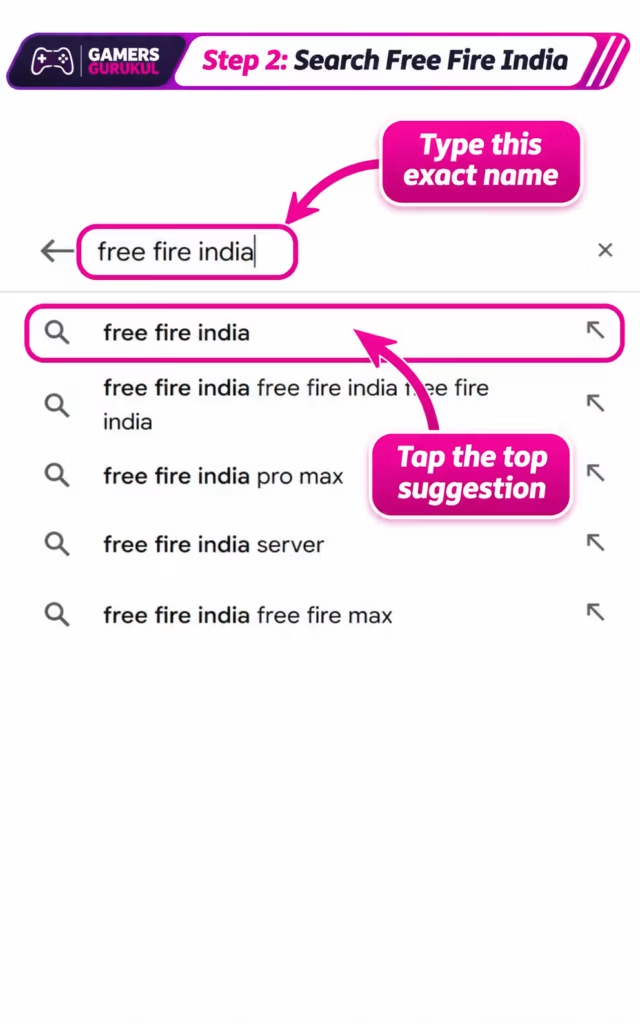
Tap the search field at the top of Google Play and type:
Free Fire India
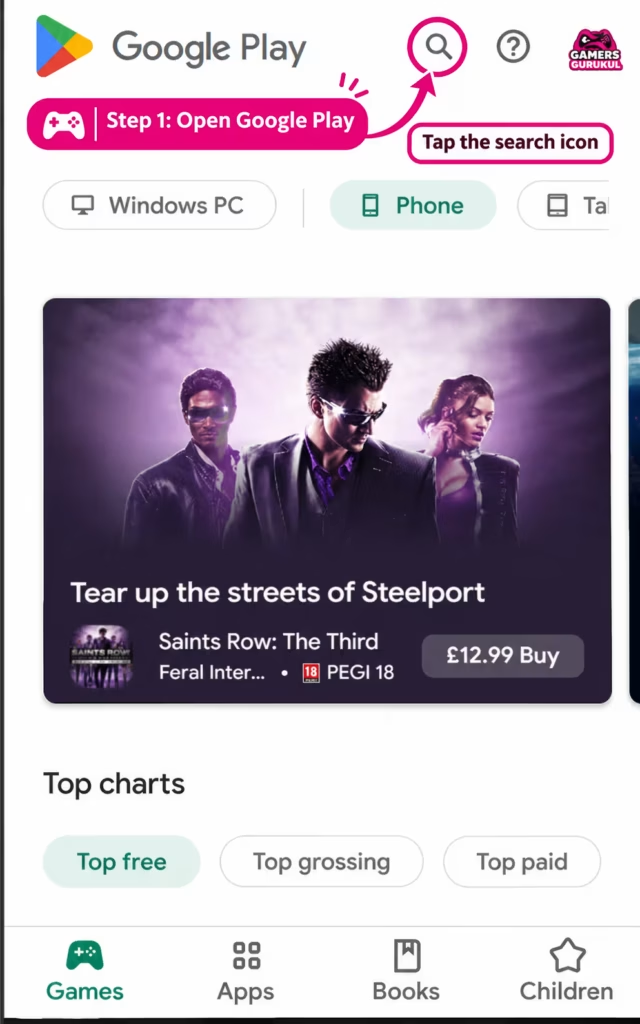
You may see several related search results, including Free Fire MAX, gaming tools, wallpapers or unofficial applications.
Choose the result titled Free Fire India, published by Garena International III.
If finding the correct result is difficult, use the official Google Play button near the beginning of this guide.
Step 4: Verify the Real App Before Installing
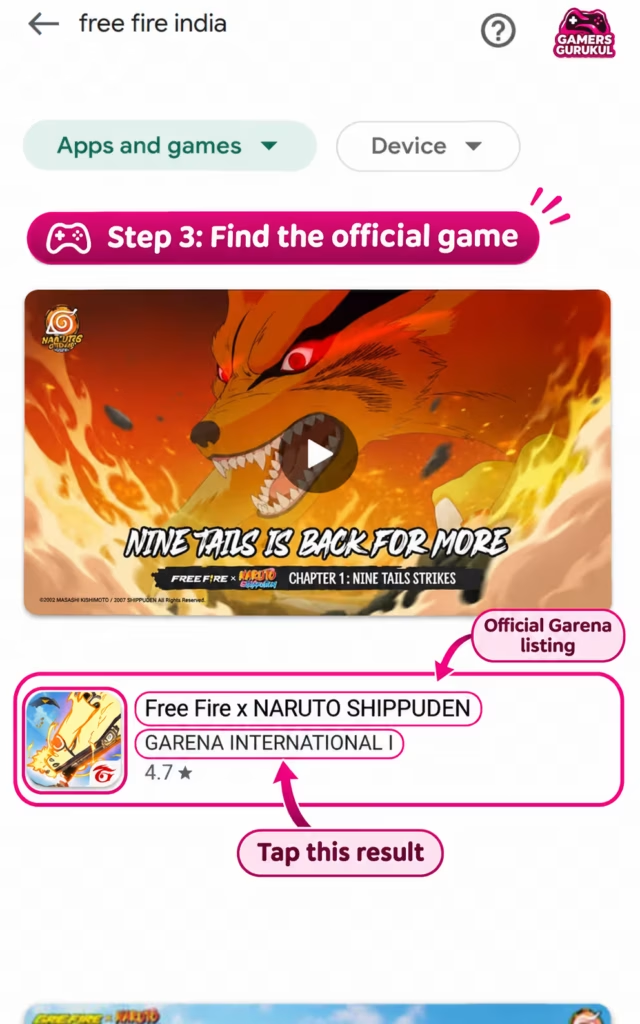
Open the game’s product page and check the following details:
- The title is Free Fire India.
- The developer is Garena International III.
- The Google Play link contains the package ID
com.garena.game.ffi. - The listing includes the game’s description, ratings and screenshots.
- Google Play shows the installation or compatibility option for your phone.
These checks are important because downloading a similarly named application does not guarantee you’re installing the real game.
Step 5: Tap Install
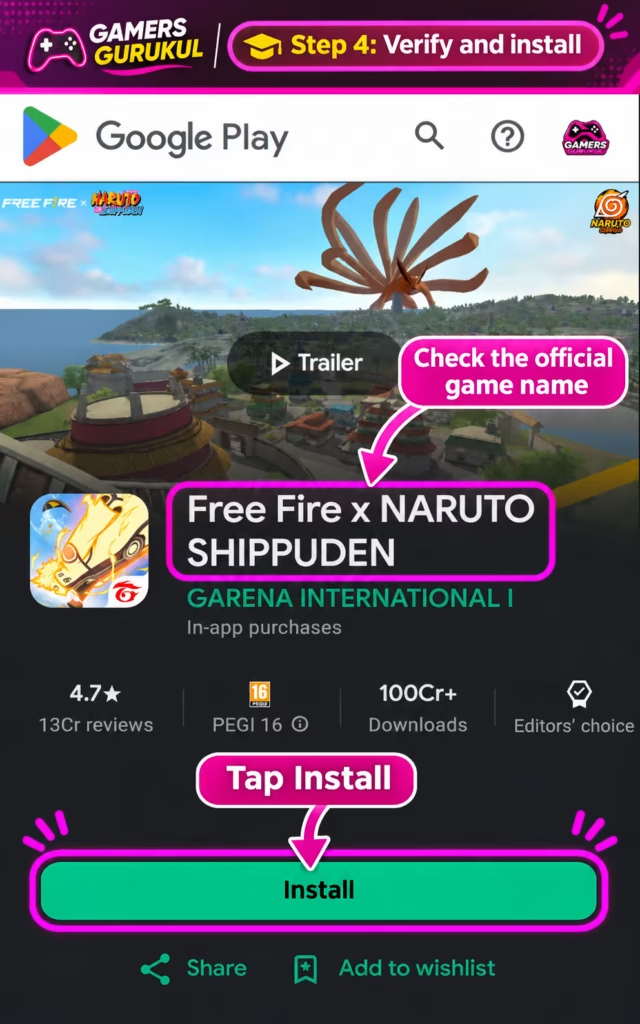
Once you’ve verified the listing, tap Install.
Google Play will download the app and install it automatically. You do not need to open a separate APK file, approve an unknown installer or disable your phone’s security settings.
Keep your phone connected while the download finishes.
If Google Play says the game isn’t compatible with your device, read our compatibility section before trying anything else.
Step 6: Open Free Fire India
When installation is complete, tap Play or Open on the Google Play page.
You can also launch it from your phone’s home screen or app drawer.
The first time you start a large online game, loading may take longer than usual. Let the game finish its opening checks and initial setup.
Step 7: Download Any Additional Game Resources
Free Fire India may ask you to download additional game data after opening it. These resources can include graphics, maps, character files, audio or other assets needed by the current version.
Follow the instructions shown inside the app. The amount of extra data depends on the game version and the resources already installed.
A stable Wi-Fi connection is useful for this step, especially if you have a limited mobile-data plan.
Do not repeatedly close the app while it is downloading required resources. If the progress is stuck, check your connection and available storage before restarting.
Step 8: Sign In or Create an Account
Once the game reaches its login screen, choose one of the sign-in methods offered by the current application.
If you’re an existing player, use the correct login method connected to your account. If you’re new, follow the game’s registration steps and keep your login information secure.
Important: Free Fire India uses India-region accounts. An account created for another region may not work in this client. We’ll explain the exact region errors later in the guide.
Players under 18 must follow the game’s parental-consent requirements. Garena’s official FAQ describes a parent or guardian mobile-number verification process for eligible underage registrations.
Step 9: Set Your Graphics and Controls
Before joining a competitive match, open the game’s settings and review the available graphics, sensitivity, controls and audio options.
If you’re using an older or budget Android phone, starting with lower graphics settings is often sensible. You can increase them later if gameplay is smooth.
Don’t assume the highest graphics preset will provide the best experience. Stable performance matters more than maximum detail in a fast-paced shooter.
Step 10: Start Your First Match
You’re now ready to play.
Explore the current game modes and choose an introductory or standard match option. Take time to learn movement, aiming, inventory management and the shrinking safe zone.
Free Fire India includes familiar battle royale gameplay in which players compete to be the last surviving player or team. Its Google Play description also highlights four-person squads and the fast-paced Clash Squad mode.
For your first few games, focus on getting comfortable with the controls rather than worrying about winning every match.
How to Download Free Fire India on iPhone in 2026 — Step by Step
Free Fire India is also officially available for iPhone and compatible iPad models through Apple’s App Store.
The iPhone installation process is slightly different from Android, but you still don’t need third-party download websites or modified game files.
Step 1: Check Your iPhone’s iOS Version
According to the current India App Store listing, Free Fire India requires iOS 13.0 or later. Compatible iPads require iPadOS 13.0 or later.
To check your version:
- Open Settings on your iPhone.
- Tap General.
- Tap About.
- Look for the iOS Version field.
If your phone supports a newer iOS version, you can check for updates under Settings > General > Software Update.
Running iOS 13 or later meets the published operating-system requirement, but doesn’t guarantee perfect performance on every device.
Step 2: Make Sure You Have Enough Free Space
The India App Store listing currently shows Free Fire India at approximately 1.5 GB.
That’s the listed app size, not a promise that the complete game will never use more storage. Extra game data, updates and temporary installation files can increase the amount needed.
To check your space, open:
Settings > General > iPhone Storage
Allow extra room beyond the displayed app size. If storage is low, remove unused files or apps after checking whether they contain anything important.
Step 3: Open the Apple App Store
Find the App Store icon on your iPhone and open it.
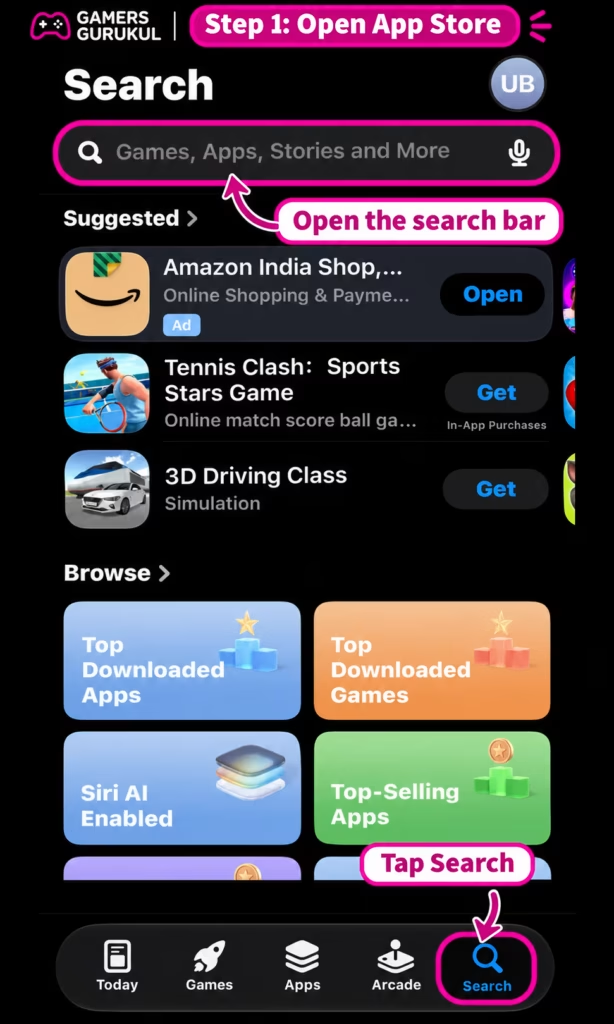
Tap the search option and type Free Fire India.
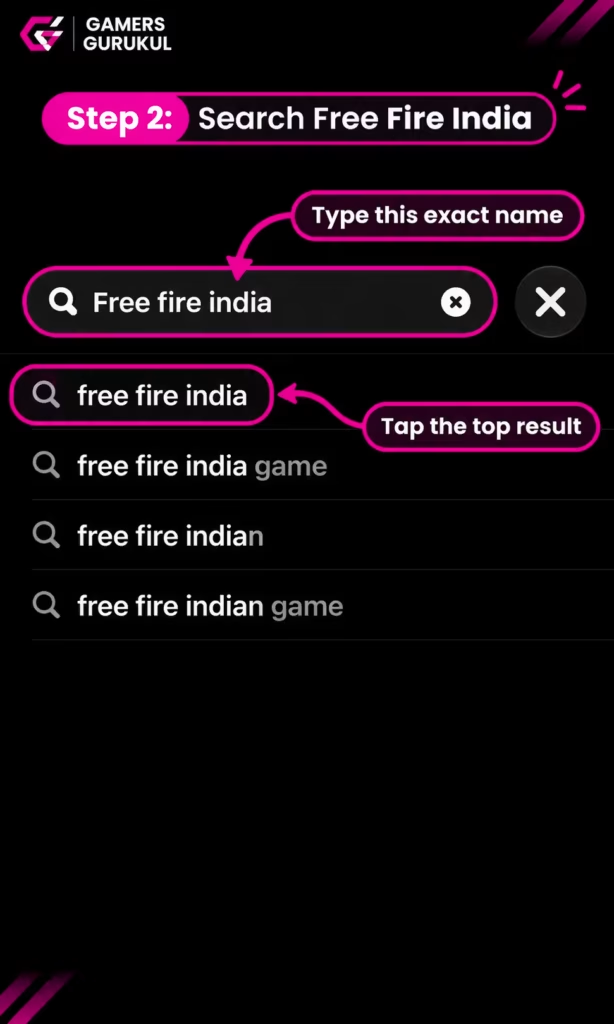
Choose the official listing from Garena International III Private Limited.
If the app does not appear, use the official direct link below. It points to the Indian App Store listing, not an unofficial IPA download.
Step 4: Verify the App Store Listing
Before installing, confirm that:
- The app is named Free Fire India.
- The publisher is Garena International III Private Limited.
- The App Store page identifies the game as free with in-app purchases.
- The App Store listing ID is
6449933265. - Your iPhone is supported and the download option is available.
The India listing currently shows a 13+ age rating, but parents should still review the violence, chat and in-app purchase information. The game’s parental-consent requirement for players under 18 is separate from the store’s age rating.
Step 5: Tap Get
Tap Get to begin downloading the game.
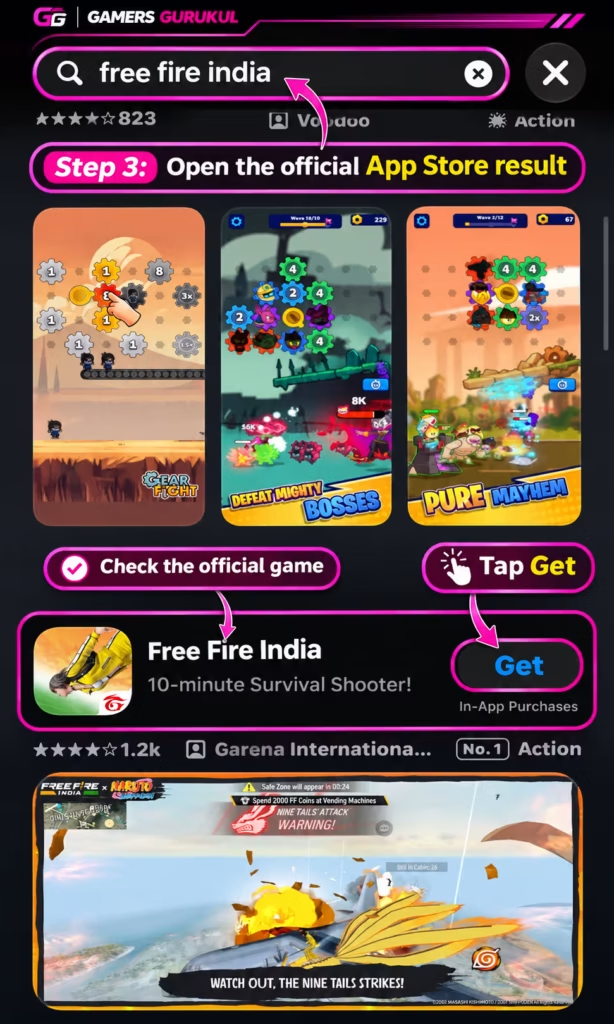
Apple may ask you to confirm the installation using Face ID, Touch ID, your device passcode or your Apple Account password.
Because the base app is free, you do not need to purchase the game to install it. Optional purchases may still be offered after installation.
Step 6: Wait for Installation to Finish
Allow your iPhone to complete the download and installation.
Keep enough free storage available and use a reliable connection. If the download stops, check your internet connection before repeatedly cancelling and restarting it.
When installation completes, the game’s icon should appear in your App Library or on your home screen, depending on your settings.
Step 7: Open the Game
Tap the game icon or tap Open in the App Store.
Follow the instructions on the screen and allow any required game data to finish downloading.
If the game requests permissions, read each request and decide whether it is appropriate. For example, voice chat may require microphone access when you choose to use that feature.
Step 8: Sign In Carefully If You Have an Older Account
This is particularly important for returning Free Fire MAX players who previously signed in using their Apple ID.
Garena explains that signing into Free Fire India using the same Apple ID previously used for Free Fire MAX can create a separate Free Fire India account. It does not automatically transfer your existing Free Fire MAX account.
If you’re returning to an older account and want to preserve your progress, check Garena’s official account guidance before creating a new profile.
We’ll explain the available account-recovery steps in more detail below.
Step 9: Set Up Your Controls
Once you’re inside the game, explore the control and graphics settings.
If you’re new to touchscreen shooters, start by becoming comfortable with movement, aiming and using the on-screen buttons.
You can adjust sensitivity gradually after a few matches. Avoid copying another player’s entire control setup if it feels uncomfortable on your device.
Step 10: Play Your First Match
Choose a game mode, join a match and begin playing.
Free Fire India’s battle royale mode focuses on gathering equipment, staying inside the safe zone and surviving against other players. Squad play is also available for people who want to team up with friends.
For other cooperative mobile games that don’t revolve around battle royale combat, see our best co-op mobile games for Android and iPhone guide.
Free Fire India System Requirements and Download Size
Before downloading a large mobile game, it’s worth checking whether your phone can actually run it.
Garena says Free Fire India has been optimised for a broad range of smartphones. That doesn’t mean every old phone will work equally well.
| Requirement | Android | iPhone |
|---|---|---|
| Official store | Google Play | Apple App Store |
| Operating system | Check current Play Store device compatibility | iOS 13.0 or later |
| Listed download size | Varies by app version and device | Approximately 1.5 GB |
| Extra game files | May be required | May be required |
| Internet | Required for online play | Required for online play |
| Price | Free with optional purchases | Free with optional purchases |
What about 2 GB, 3 GB or 4 GB RAM Android phones? A RAM figure alone cannot guarantee that Free Fire India will work smoothly. Your Android version, processor, GPU, available storage and current game update also matter.
The most reliable starting point is the compatibility result shown by the official Google Play listing for your exact phone.
If you have an older phone, begin with lower graphics settings, avoid heavy background applications and check whether the game remains stable during a normal match.
Free Fire India vs Free Fire MAX: Which One Should You Download?
This is one of the most common reasons players become confused after installing the game.
Free Fire India is a separate India-focused client. Free Fire MAX is a different version of the Free Fire experience, and the version you should use depends partly on your account’s region.
| Feature | Free Fire India | Free Fire MAX |
|---|---|---|
| Main audience | India-region players | Players in supported MAX regions |
| Application | Standalone India client | Separate MAX client |
| India-specific content | Yes | Not the dedicated India client |
| Account access | Designed for India accounts | Requires a supported account region |
| Installation | India Google Play or App Store | Regional MAX store listing |
According to Garena’s official India support FAQ, trying to sign into Free Fire MAX with an India-region account may produce a region warning directing you to Free Fire India.
Likewise, a non-India account may not work in Free Fire India.
Don’t uninstall an older game or delete account data just because a login fails. First check the client, account region and login method.
How to Log In With Your Existing Free Fire or Free Fire MAX Account
If you’ve played Free Fire before, you may want to keep your existing account, purchased items, characters and game progress.
Don’t assume installing Free Fire India automatically transfers everything. Account access depends on the region, platform and account-binding arrangements.
For Existing Android Players
- Check the exact account and login method you previously used.
- Confirm whether the account belongs to the India region.
- Open the correct Free Fire India client.
- Choose the supported sign-in method associated with your account.
- Follow any account or region verification instructions.
- If the login fails, read the full error message rather than creating another account immediately.
If your existing account belongs to a different region, you may need the matching client for that account.
For Existing iPhone Players Using Apple ID
Garena has published a specific warning about Apple ID login.
If your existing Free Fire MAX account is linked to Apple ID, signing into Free Fire India with that same Apple ID can create a separate new account instead of opening the old one.
Garena recommends that eligible users bind a recovery email to their existing account and switch their primary login method to that email where supported, before attempting to access it in Free Fire India.
Do not assume that using the same Apple ID guarantees the same account. If a new profile appears, avoid making purchases or changing account details until you understand which account you’re using.
If you have already created a separate account accidentally, contact Garena’s support centre rather than repeatedly signing in with different credentials.
You can read the official explanation in the Free Fire India account and region FAQ.
How to Fix Free Fire India Region and Login Errors
Some errors are caused by using the wrong game version, not by typing the wrong password.
Garena identifies three particularly important situations.
Error 1: “Your current registration has been detected as India”
This can appear when you’re trying to register an account from India using a game client that isn’t Free Fire India.
What to do: Check that you’re using the official India version. Turn off VPN or proxy services that may change the region reported to the game, then try again using the correct client.
Error 2: “Your account has been detected as being in the India region”
This message can appear when you try to use an India-region account with regular Free Fire or Free Fire MAX.
What to do: Install the official Free Fire India client and sign in using the supported method for your account.
Error 3: “The account you are logging in with is not in the India region”
This means you’re attempting to sign in to Free Fire India using an account Garena identifies as belonging to another region.
What to do: Check the account’s actual region and use the correct regional version. Don’t try to force the login with an unofficial APK or a location-changing VPN.
If you still receive the message after checking the correct app and account, contact Garena’s India Support Centre.
Free Fire India Not Showing in Google Play or App Store?
The game launched on October 28, 2026, but that does not mean every phone, store account or region will display the same installation result.
If you can’t find it, work through the following checks.
1. Use the Exact Official Store Link
Search results can be cluttered with similar names. Opening the verified Google Play or App Store listing is the easiest way to avoid confusion.
2. Check Your Store Country
Free Fire India is designed for India-region accounts. A Google Play or Apple Account set to another country may not show the same application listing.
Check your existing store settings through Google’s or Apple’s official account controls. Don’t change your country simply to evade availability restrictions.
3. Check Device Compatibility
Google Play and the App Store may hide or restrict installation on unsupported devices.
On iPhone, confirm that your device meets the current iOS requirement. On Android, trust the compatibility message displayed by Google Play for your phone.
4. Check Parental or Family Restrictions
Age ratings and parental-control settings may affect whether the game appears or whether installation is allowed.
If a parent or guardian manages your account, ask them to review the restrictions rather than trying to bypass them.
5. Check the Official Announcement
For current availability and event information, use the official Free Fire India website.
Do not trust old social-media posts announcing an unreleased version or asking you to complete unrelated tasks before receiving a download.
Free Fire India Download Stuck or Pending? Try These Fixes
Downloading a large online game can fail for several ordinary reasons. You don’t need to reset your phone immediately.
Fix 1: Check Your Internet Connection
Try a stable Wi-Fi network. If your Wi-Fi is unreliable, test mobile data where available.
Pause other large downloads, video streams or cloud backups while installing.
Fix 2: Check Free Storage
Open your device’s storage settings and check whether there’s enough room for the application and temporary installation files.
If your device is almost full, clear unnecessary downloaded content or remove unused apps after checking for important data.
Fix 3: Restart Your Phone
A restart can resolve temporary store or network issues. After restarting, open the official app-store listing and try again.
Fix 4: Update Google Play or iOS
Check for available system updates and ensure your app store is functioning correctly.
On Android, an outdated store installation or stuck Play Store cache can sometimes affect downloads. Follow Google’s official troubleshooting instructions rather than installing third-party “store repair” apps.
Fix 5: Check the Game’s Region
If the error mentions account region, changing graphics settings or clearing random files will not solve it.
Check that the game client, account and store country match the intended India region.
Fix 6: Check Whether Extra Resources Are Stuck
If the game installs successfully but gets stuck while downloading internal resources, check your connection and storage again.
Don’t delete the entire game automatically, especially if you have an account whose recovery details aren’t safely linked.
Fix 7: Use Official Game Support
Garena maintains troubleshooting information covering download failures, loading problems, crashes, high ping and expansion-pack issues.
Visit the official Free Fire India Game Concerns help section and choose the problem that matches your screen.
How to Fix Free Fire India Lag, Crashing and High Ping
Successfully downloading the game doesn’t guarantee smooth performance. If matches lag or the app closes unexpectedly, try these checks.
Start With Lower Graphics Settings
If your phone struggles with the default graphics settings, reduce visual quality and effects where the current game version allows.
Look for a combination that keeps movement responsive and the game stable. Higher graphics aren’t worth it if the frame rate becomes inconsistent during fights.
Use a Stable Internet Connection
High ping and low FPS are different problems.
High ping concerns the delay between your device and the game servers. Low FPS concerns how smoothly the game is rendered on your screen.
For connection problems, try reliable Wi-Fi or mobile data and avoid unnecessary VPN connections. For graphics problems, review device performance and settings.
Close Heavy Background Applications
Close unnecessary demanding apps before starting the game.
If your device becomes unusually hot, stop playing and let it cool. Avoid long gaming sessions while the phone is already overheating.
Install Official Updates
Check Google Play or the App Store for updates from Garena. Updates may include fixes for bugs, compatibility issues and gameplay problems.
Do not download modified builds that promise unlimited FPS or special performance boosts.
Report Persistent Crashes
If the game crashes repeatedly at the same point, record your phone model, operating-system version and the error message.
Share those details with Garena support. You can also describe whether the problem happens at login, during resource downloads, or after entering a match.
Is Free Fire India Really Free?
Yes. The base game is free to download and start playing.
However, Free Fire India includes optional in-game purchases. Players can buy diamonds and other items through supported purchase systems.
Free-to-play doesn’t mean every character, cosmetic item or reward is immediately unlocked without any purchase or gameplay requirements.
If you’re a parent, review spending controls before allowing purchases. If you’re a player, never share your password or payment information with someone promising free diamonds.
Garena also provides information on identifying suspicious offers and scams through its official help centre.
What’s New in Free Fire India in 2026?
The most important change is that India now has its own standalone version of Free Fire, launched on October 28, 2026.
Garena says the release includes India-focused events, content and features designed to encourage responsible play.
1. India-Specific Events
Free Fire India’s launch announcement highlighted locally relevant celebrations and campaigns.
A special Diwali event is scheduled to run until November 15, 2026. As with other live-service events, availability and rewards may change after the event ends.
2. Familiar Battle Royale Gameplay
The game keeps the recognisable Free Fire formula: players land on a map, collect weapons and supplies, move inside the safe zone and attempt to survive.
The official store description highlights fast matches, four-player squads, voice communication and Clash Squad battles.
3. Responsible Gaming Features
Garena describes a number of protections intended to support healthier play, including break reminders, playtime limits and spending caps.
It also requires parental consent for eligible underage players.
4. Mobile-Focused Performance
Garena says the India release has been optimised for a broad range of smartphones.
That doesn’t mean every phone will run it at the highest graphics settings, but it does mean the game is intended for more than just expensive flagship models.
Can Children Play Free Fire India? What Parents Should Know
Free Fire India is an online shooting game with competitive combat, player interaction, chat features and optional purchases.
The current Indian app-store age ratings should be checked before installing. The Google Play listing identifies the game as Teen, while the Apple India listing currently displays 13+.
These store labels are separate from Garena’s rules for account registration.
According to Garena, players under 18 require parental consent. Its FAQ also explains that underage registration involves providing a parent or guardian’s mobile number for OTP verification.
Parents should review:
- Whether the game is appropriate for the child’s age.
- Chat and voice communication with other players.
- In-app purchases and payment authorisation.
- Daily playtime and breaks.
- Privacy settings and account security.
- Whether an unknown person is asking for personal details.
Parents can also use Google Family Link or Apple’s Screen Time settings, where supported, to manage app access and purchases.
Children should never share their real address, account password, private contact details or verification codes with strangers inside the game.
Should You Download Free Fire India APK or OBB Files From Other Websites?
For most readers, no. The official India version is available directly from Google Play and the Apple App Store.
Websites advertising an unofficial Free Fire India APK, modified OBB, unlimited diamonds or special unlocked version may distribute outdated, altered or unrelated files.
Installing an unverified package also makes it harder to know whether you’re using the correct India client and receiving legitimate updates.
On Android, follow the official Play Store installation process. On iPhone, use the App Store rather than downloading an alleged Free Fire India IPA file from a random website.
Never disable important security protections simply because a third-party download page tells you to.
Can You Play Free Fire India Offline?
No, Free Fire India is designed as an online multiplayer battle royale game. You need a suitable internet connection to log in and play normal online matches.
If you want mobile games for situations where you don’t have reliable Wi-Fi or mobile data, our best offline open-world games for Android and iPhone article covers alternatives that focus more on solo exploration.
Frequently Asked Questions About Free Fire India Download
Is Free Fire India available in 2026?
Yes. Garena officially released Free Fire India on October 28, 2026, as a standalone game for Android and iOS users in India.
How do I download Free Fire India for free?
Open the official Free Fire India listing on Google Play or the Apple App Store, verify the Garena publisher details, and tap Install or Get. Follow any first-launch resource and account setup steps.
What is the official Free Fire India Play Store link?
The official Android listing is https://play.google.com/store/apps/details?id=com.garena.game.ffi.
What is the official Free Fire India iPhone link?
The official Indian App Store listing is https://apps.apple.com/in/app/free-fire-india/id6449933265.
Is Free Fire India the same game as Free Fire MAX?
No. Free Fire India is a separate client designed for India-region accounts. Free Fire MAX is another version with its own regional availability and account requirements.
Is Free Fire India free or paid?
It is free to download and play, with optional in-game purchases such as diamonds and other content.
Can I download Free Fire India on a 2 GB RAM phone?
Compatibility depends on more than RAM alone. Check the official Google Play listing for your exact device and its current Android version. If it installs but runs poorly, try lower graphics settings.
How many GB is Free Fire India on iPhone?
The current India App Store listing shows approximately 1.5 GB. You’ll need additional free storage for installation, updates and any extra resources.
Why is Free Fire India not showing in my Play Store?
Your store account region, device compatibility, age restrictions or app-store search results may be responsible. Open the official direct link and check whether Google Play offers installation for your device.
Can I play Free Fire India outside India?
Free Fire India is designed for India-region accounts. Players with non-India accounts should use the correct supported regional game client rather than attempting to bypass restrictions with a VPN.
Will my old Free Fire MAX account work in Free Fire India?
Do not assume every account transfers automatically. Account access depends on the login method and region. Garena specifically warns that Apple ID login may create a separate Free Fire India account instead of opening an existing Free Fire MAX profile.
Can I play Free Fire India without internet?
No. Its core battle royale and squad gameplay depend on online services.
Is it safe to download Free Fire India from APK websites?
The recommended installation method is through the official Google Play or Apple App Store listing. Unknown APK mirrors may provide modified files or the wrong regional game client.
What should I do if Free Fire India keeps crashing?
Check storage, install official updates, restart the device and reduce graphics settings if possible. If crashes continue, use the Free Fire India support centre to report the issue.
Can I download Free Fire India on PC or laptop?
This guide covers Garena’s official Android and iPhone releases. We haven’t established a separate official Windows version of Free Fire India. Avoid unknown PC installers claiming to be the game, and check Garena’s current platform announcements before trying other methods.
Are Free Fire India and BGMI the same game?
No. Free Fire India is Garena’s battle royale title, while BGMI is a separate game. Both involve online survival shooting, but their controls, gameplay systems, maps and progression are different.
Final Verdict: The Safest Way to Download Free Fire India in 2026
After years of waiting, Indian players can once again download a dedicated Free Fire version directly from official app stores.
If you use Android, download Free Fire India through Google Play. If you use an iPhone, install the official India version through the Apple App Store.
Before signing in, take a moment to check whether you have an older Free Fire or Free Fire MAX account. Choosing the correct client and login method can save you unnecessary account problems.
Once the game is installed, check your graphics settings, download any required resources and begin with a few normal matches while you get comfortable with the controls.
At Gamers Gurukul, we recommend using the verified download links rather than untrusted APKs, modified installations or websites promising unlimited diamonds.
And if you’re looking for something new to play after Free Fire India, browse our latest Android games worth trying in 2026, including fresh action games, shooters and lesser-known discoveries.
Have you installed Free Fire India yet? Tell us which phone you’re playing on and whether the game is running smoothly. Your experience could help other players decide which settings to try.