Call of duty Mobile on PC/Laptop Free Download 2026!
Want to play Call of Duty: Mobile on PC or laptop with a bigger screen, keyboard and mouse? GameLoop offers a way to run the mobile game on Windows, and this guide will walk you through the process using real installation screenshots.
Before downloading, there’s something important to know. GameLoop advertises COD Mobile support through its Android emulator, but Activision’s current support documentation says the game does not officially support emulators. This method is therefore not a native Windows version or a guarantee of publisher support.
In this COD Mobile PC download guide for 2026, you’ll learn how to download and install GameLoop, find Call of Duty: Mobile, download the game files, set up controls and solve common installation problems.
Quick answer: Open the official GameLoop COD Mobile page, download GameLoop, run the Windows installer, locate Call of Duty: Mobile inside the application, and follow its download and launch instructions.
Last checked: November 5, 2026. Screenshots show the interface from the supplied walkthrough. Buttons and download availability may change with software updates.
Page Contents
Can You Play Call of Duty: Mobile on PC?
Yes, some players use Android emulation software to run COD Mobile on Windows. An emulator creates an environment where Android applications can operate on a computer.
GameLoop is developed by Tencent and has a dedicated Call of Duty: Mobile listing. It provides keyboard mapping, mouse controls and configuration options intended for PC gaming.
However, this is different from having an official native PC version. Activision currently says its mobile game does not officially support emulators.
This means you should not assume that emulator use is approved, guaranteed to work after every update or protected from account restrictions.
COD Mobile PC Requirements
GameLoop’s Call of Duty: Mobile page lists the following hardware requirements.
| Component | Minimum | Recommended |
|---|---|---|
| Operating system | Windows 8.1/10 64-bit | Windows 8.1/10 64-bit |
| Processor | Intel Core i3-9320 | Intel Core i3-9320 |
| Graphics | GTX 660 | GTX 1050 |
| RAM | 8 GB | 16 GB |
Important: These are GameLoop’s published specifications, not verified requirements for every current COD Mobile update. Its displayed 20 MB storage figure does not represent all installed game files and downloadable resources. Keep substantially more storage available.
Windows 11 is not explicitly listed in GameLoop’s published COD Mobile requirement table, so check current compatibility information if you’re using it.
How to Download and Install COD Mobile on PC — Step by Step
Follow the screenshots below in order. Each image has a red arrow or circle highlighting the relevant area of the original GameLoop interface.
Step 1: Visit the Official GameLoop Website
Open Chrome, Edge or another browser on your Windows PC and visit www.gameloop.com.
Step 2: Find the Call of Duty: Mobile Download
Look near the top-right corner for the Download button. Do not accidentally click a download button for an unrelated featured game.
GameLoop’s website also displays individual games. Search for Call of Duty: Mobile or open its dedicated game page.
In your screenshot, the COD Mobile result has a purple Download button beside the game title.
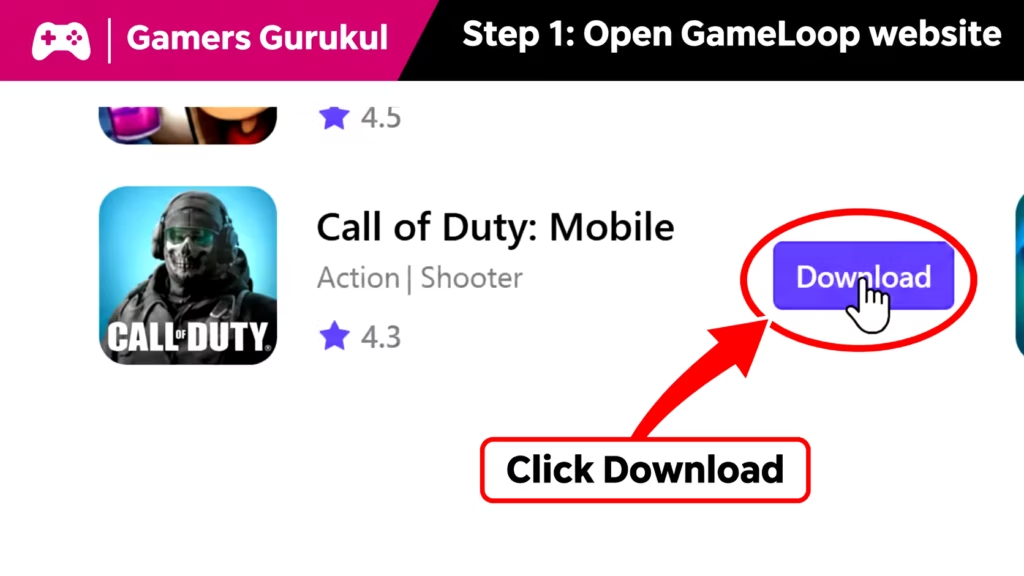
Choose that option to start the Windows installation process.
Step 3: Find the Downloaded Installer
When the download finishes, open your browser’s Downloads panel or the Downloads folder on your computer.
The walkthrough shows a file whose name begins with GLP_installer_ and ends with .exe.
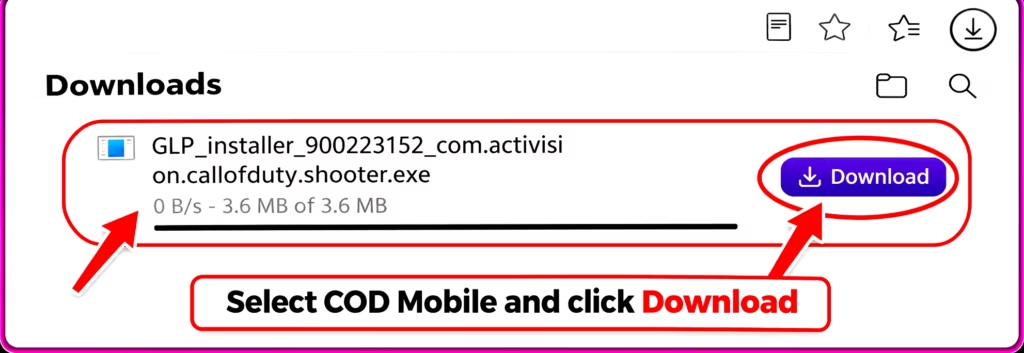
Its exact filename may change between GameLoop versions.
Safety check: Confirm that you downloaded the file from GameLoop’s genuine website. Do not disable Windows Security just to open an unknown executable.
Step 4: Install GameLoop
Open the verified installer. Windows may ask you to approve the application. Review the file’s source and publisher information before proceeding.
Once the setup window appears, click Install and follow the on-screen instructions.
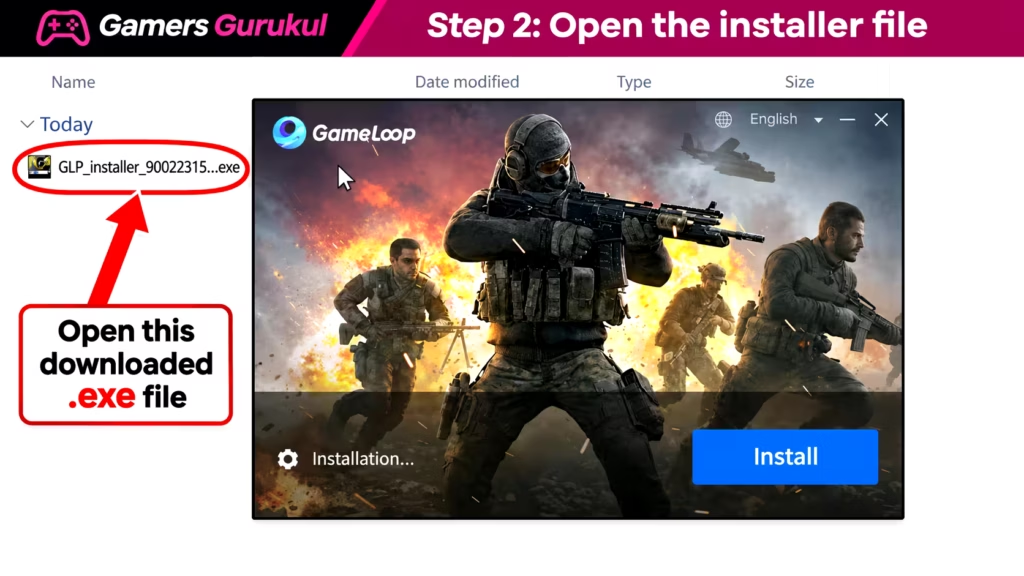
Keep enough free storage available for both GameLoop and COD Mobile’s game files.
Step 5: Click Start to Open GameLoop
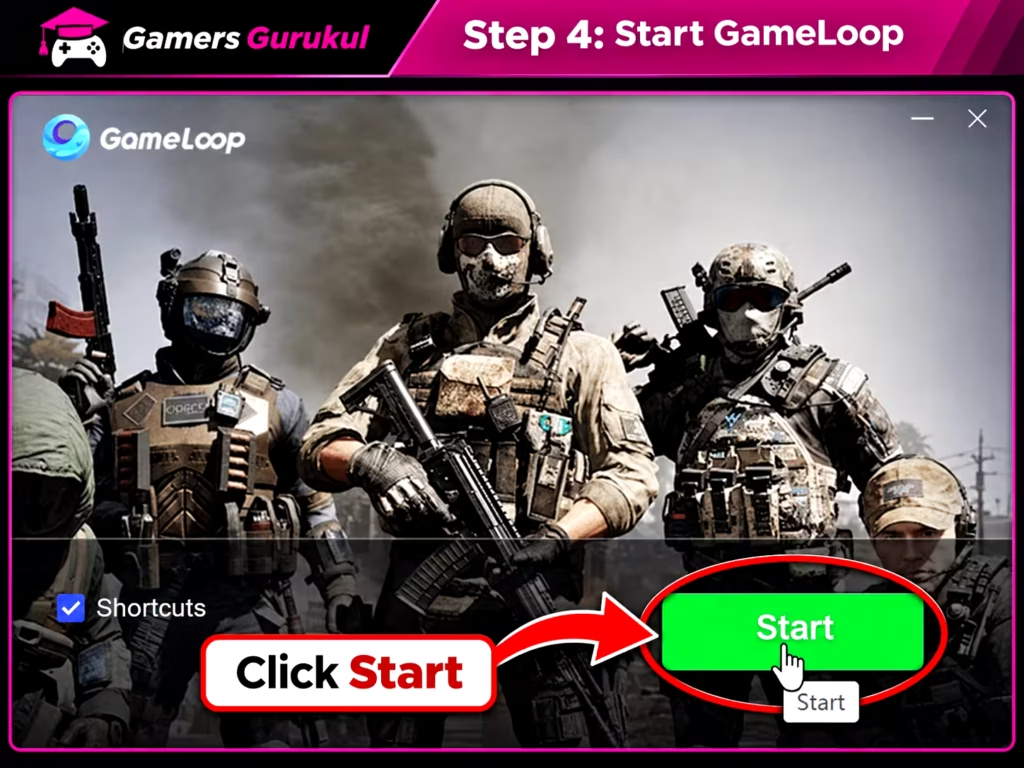
When the initial installation finishes, the setup window may display a green Start button.
Click it to launch GameLoop. Allow the application to finish loading its library and required services.
Step 6: Open Call of Duty: Mobile Inside GameLoop
Once GameLoop opens, use its search or game library to find Call of Duty: Mobile.
Make sure the game listing matches the version you intend to play. Regional editions, including the Garena version, may have separate account requirements.
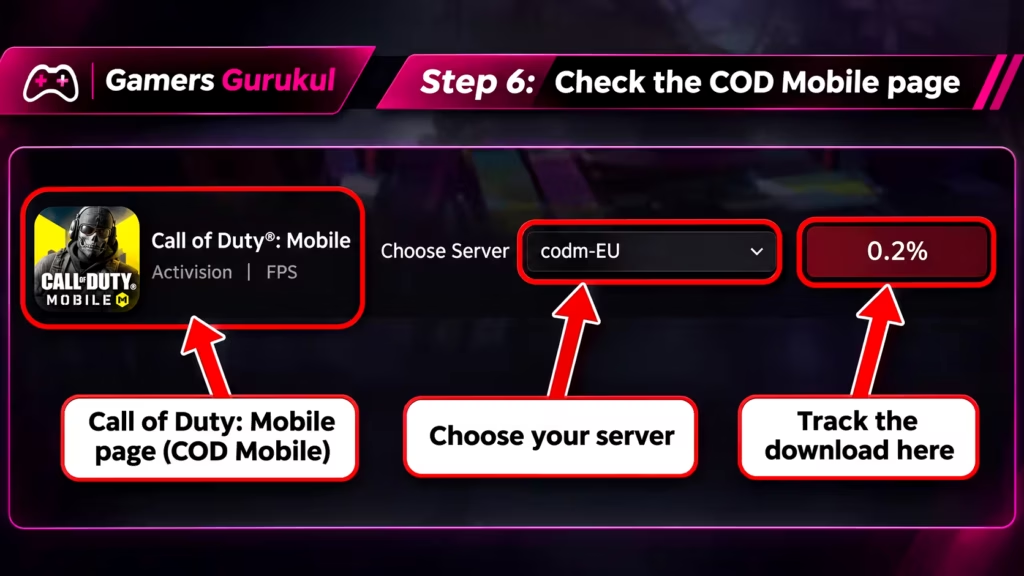
On the game page, you should be able to see its title, publisher information and available download controls.
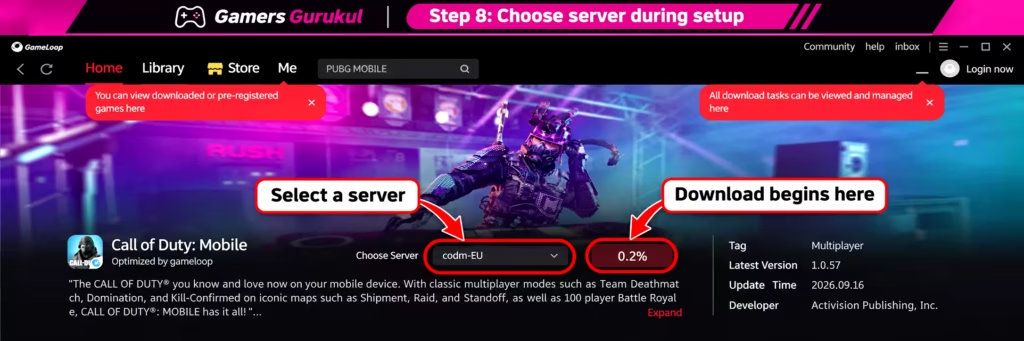
Step 7: Check Server Selection and Download Progress
Your screenshot shows a server selector displaying codm-EU and a download indicator starting at 0.2%.
If your GameLoop version provides a similar selector, follow the instructions for your supported game edition. The download-server setting should not be used as a way to bypass region restrictions.
Step 8: Wait for the Main Game Download
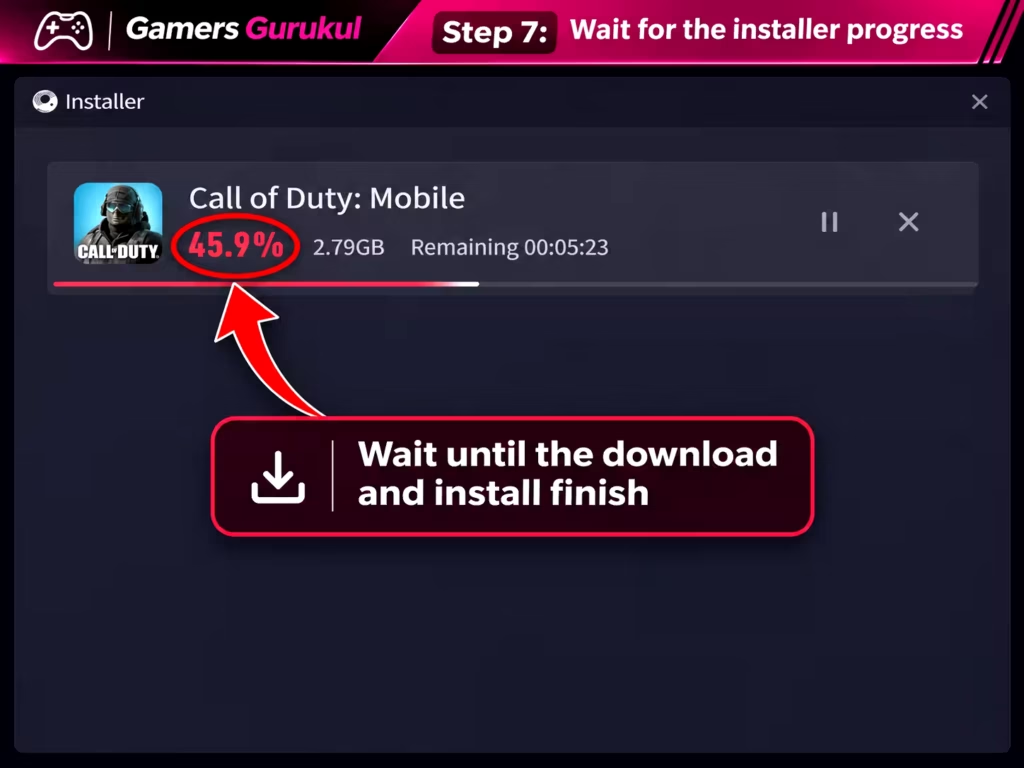
GameLoop may open a separate installer showing the game’s download progress.
The supplied screenshot shows Call of Duty: Mobile at 45.9%, with the remaining download time displayed beside it.
These numbers are examples from the recording. Your download size, percentage and completion time will depend on your connection and game version.
Don’t close the installer while the download is still active.
Step 9: Click Open to Launch COD Mobile
Once installation finishes, GameLoop may display a red Open button.
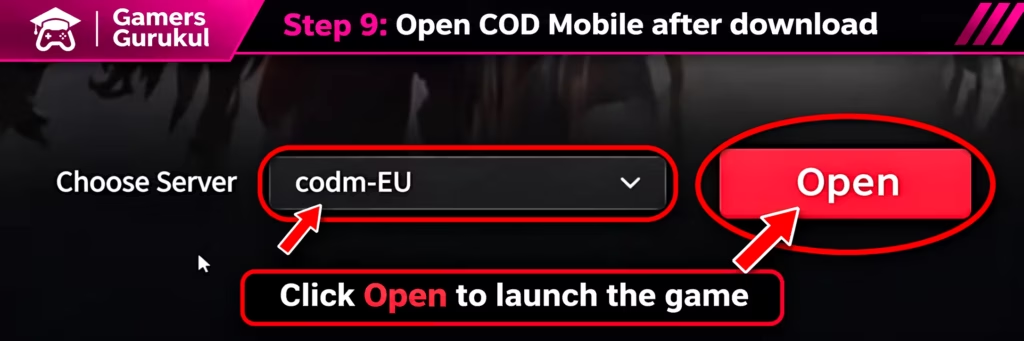
Click it to launch Call of Duty: Mobile inside the emulator.
The game might need additional setup before you can sign in or begin playing.
Step 10: Download Additional In-Game Resources
During the first launch, Call of Duty: Mobile may download more resources.
The loading screen in your screenshot displays a yellow progress bar, resource download information and 63% completion.
Leave the game running until these required resources finish downloading. Other maps, graphics and game assets may need additional downloads later.
Step 11: Sign In to Your COD Mobile Account
When the login screen appears, use the supported login method associated with your existing COD Mobile account.
If you already play on Android or iPhone, check that your account is linked properly before trying to access it through another client.
Using a guest account or an incompatible regional edition may create a different profile or prevent access to your existing progress.
Never enter your login credentials into an unofficial website claiming to unlock COD Mobile PC accounts.
Step 12: Configure Keyboard and Mouse Controls
GameLoop provides keyboard and mouse mapping tools for supported games.
Check the currently selected layout before playing. Typical shooter controls use WASD for movement and the mouse for aiming, although the exact layout may differ by version.
Open the emulator’s key-mapping settings if you need to change a key. Avoid external macros or tools designed to automate gameplay.
Step 13: Adjust Graphics and Sensitivity
Open the game settings and choose graphics options suitable for your computer.
For an entry-level PC, start with moderate or lower graphics settings. You can increase them later if the game runs smoothly.
Mouse sensitivity often feels different from touchscreen aiming, so test a few settings in a practice environment before joining competitive matches.
Step 14: Start a Casual Match
Once the game loads, choose a suitable game mode and test the controls.
Remember that emulator matchmaking and available game modes may differ from phone-only play. The current publisher policy does not guarantee that an emulator will remain supported.
Is GameLoop Safe? Can You Get Banned?
This is an important question for anyone with an existing COD Mobile account.
GameLoop markets itself as the dedicated emulator for Call of Duty: Mobile, but Activision’s current support documentation says COD Mobile does not officially support emulators.
Therefore, we cannot promise that using GameLoop is completely risk-free or that Activision will provide support if the emulator stops working.
Activision’s security policy also prohibits unauthorized software used for cheating, manipulating game data or gaining unfair advantages.
Never use aimbots, modified game files, cheats, macros, anti-cheat bypasses or unofficial installers.
For the latest rules, read Activision’s COD Mobile support guidance.
Common COD Mobile PC Problems and Fixes
GameLoop Download Button Is Not Working
GameLoop’s COD Mobile page currently includes a notice that its platform is being updated. It directs users toward its support channel for details about newer-version access.
If the download is unavailable, check that official notice instead of downloading an unknown replacement installer.
COD Mobile Download Is Stuck
Check your internet connection, restart GameLoop where appropriate and confirm that enough storage is available.
Also check whether another application is downloading large files in the background.
GameLoop Shows a Black Screen
Restart your computer and update your graphics drivers through the official NVIDIA, AMD or Intel website.
If GameLoop provides rendering-engine settings, check its support documentation before changing them.
COD Mobile Is Lagging on PC
Lower graphics quality, close unnecessary background applications and check that your computer meets the listed requirements.
For laptops, connect the power adapter and monitor overheating.
If the problem is high ping rather than low FPS, focus on improving your network connection instead of graphics settings.
Keyboard and Mouse Are Not Working
Open GameLoop’s key-mapping settings and check whether the default profile is correctly selected.
Resetting the layout may help after a game update. Avoid unsupported external control-mapping tools.
My COD Mobile Account Will Not Log In
Confirm whether you’re using the Global or Garena game edition and whether the login method matches your original account.
If the usual login option isn’t available, don’t use unofficial account-transfer services.
Windows Security Blocks the Installer
Check the file source and any security warnings before proceeding.
Do not disable your antivirus or restore suspicious files automatically. If you cannot verify the installer, don’t run it.
Is Playing COD Mobile on PC Worth It?
For some players, using a monitor and mouse can make aiming and navigating the interface more comfortable. GameLoop also offers configuration options and keyboard mapping.
However, the process is more complicated than installing a normal Windows game. You may need additional downloads, compatibility troubleshooting and adjustments after updates.
Most importantly, Activision’s current support position means emulator users should not assume official compatibility or account protection.
If you’re looking for free games designed for Windows instead, explore our best new free PC games in 2026, which includes newer releases beyond the familiar mainstream shooters.
If you prefer mobile gaming, our best Android games guide also covers COD Mobile and other worthwhile mobile releases.
Frequently Asked Questions
Is Call of Duty: Mobile free on PC?
COD Mobile is a free-to-play game, and GameLoop is offered as a free emulator. Optional in-game purchases remain available.
Does COD Mobile have an official PC version?
The version covered here is not a native Windows game. It is the Android title running through GameLoop.
Is GameLoop officially supported by Activision?
GameLoop advertises COD Mobile support, but Activision’s current documentation says the game does not officially support emulators. Do not treat GameLoop’s marketing as an Activision guarantee.
Can I get banned for using GameLoop?
No one can guarantee account safety. Follow Activision’s current rules, avoid unauthorized software and understand the risks before using an emulator.
Can I play COD Mobile on Windows 11?
Some GameLoop installations may work, but its published COD Mobile requirements explicitly list Windows 8.1/10. Check current support information for Windows 11 compatibility.
How much RAM does COD Mobile need on PC?
GameLoop’s listing shows 8 GB as the minimum and 16 GB as recommended. Actual performance depends on other hardware and software factors.
Can I use the same mobile account on PC?
You may be able to sign in with a compatible linked account, but login options, game edition and region must match. Account access through the emulator is not guaranteed.
Can I use a controller in GameLoop?
GameLoop advertises controller and key-mapping options. Availability and compatibility can vary between versions.
Can I play COD Mobile on Mac?
The GameLoop installation covered here is for Windows. We have not verified an official GameLoop macOS version of this process.
Why does COD Mobile download extra resources?
The emulator, main game files and additional in-game resources are separate parts of the installation. Extra assets may download during the first launch or after later updates.
Will I play against mobile players?
Older support materials describe separate emulator matchmaking. The current behavior of parties, modes and matchmaking may vary, and emulator use is not guaranteed to be supported.
Is COD Mobile the same as Warzone on PC?
No. COD Mobile is a separate mobile title. Other Call of Duty games available for Windows are different products.
Final Verdict
If you want to try Call of Duty: Mobile on PC in 2026, GameLoop provides a documented Windows installation route.
The screenshots in this guide show how the process moves from the GameLoop website to the installer, then into the game download, launch screen and additional resource setup.
Still, it’s important to remember that this is an emulator-based method, not a native Windows release officially supported by Activision.
At Gamers Gurukul, our aim is to help readers make informed choices. That means explaining both how a download works and the limitations you should know before installing it.
Have you tried COD Mobile through GameLoop? Share your PC specifications and the step where you encountered a problem. Your experience may help another player troubleshoot their setup.